Star lights: how a galaxy projector works and how to choose one
Star lights are bought on a listing render and judged in a dark bedroom, where the picture is grainy, the edges are soft and the motor hums. Most of what a galaxy projector does is decided by two small light sources and the optics in front of them. The rest is printed on the box, in the laser class and the blue-light rating.
Key takeaways
- Laser stars come from a green diode through a grating; clouds and aurora from RGB LEDs behind a textured optic. Both are motorised.
- Insist on laser Class 1 or 2 and a blue-light rating of RG0 or RG1; no class stated means no purchase.
- Match throw and focus to the room: a 1.5–3 m focus range and 10–20 m² of coverage suit a bedroom ceiling.
- For sleep: laser off, slowest speed, timer at 30–60 minutes; a quiet motor matters more than a bright maximum.
- The children's type uses no laser at all; the optical disc type is for actually looking at a sky.
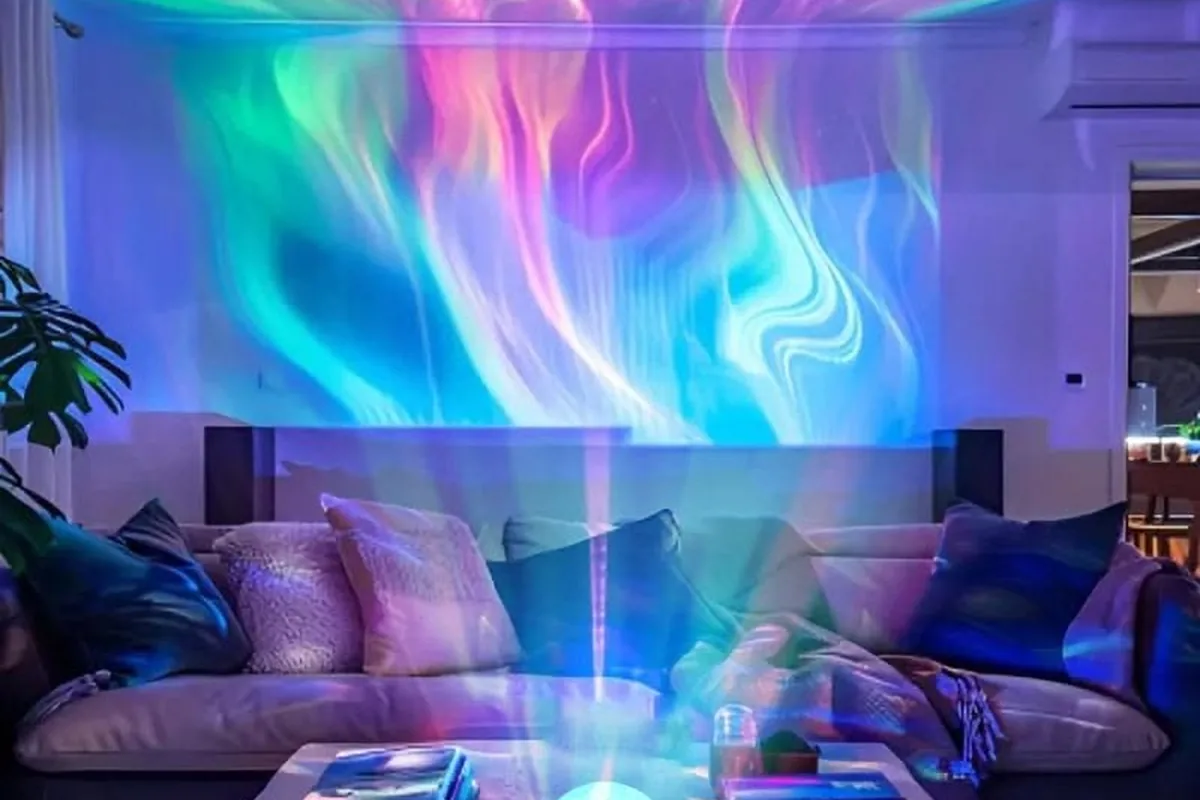
How the picture is made
Most star lights build their image from two layers that run at the same time.
The stars come from a low-power laser diode, usually green and sometimes green plus red, shining through a diffraction grating. The grating splits the single beam into hundreds of sharp points, and because laser light stays focused over distance, the points are crisp on a ceiling three metres away. A small motor turns the grating so the whole field drifts. Because a grating makes them, the points fall in a regular pattern rather than a natural scatter, so a laser sky never quite looks like the real one; on cheap units the laser also blinks rather than twinkles.
The nebula, aurora or water comes from RGB LEDs behind a textured optic — a moulded lens or a rippled film — that is also turned by a motor. The LEDs blend colours; the optic smears them into clouds, waves or bands that move across the surface. Change the colour mix and the speed and the same hardware reads as an aurora, a nebula or light on water. Run it in blue alone and it is the effect a water ripple light produces on its own.
A different class of product replaces both layers with a single optical projector: several high-transmission lens elements and a printed star disc, the same idea as a planetarium, often with interchangeable discs. These show actual constellations, the Milky Way and deep-sky objects with fine detail, and the image is static or turns very slowly. They are dimmer and calmer than the laser type and are bought for quiet viewing and sleep rather than for a party.
Three common types
| Type | What is inside | What it looks like | Where it fits |
|---|---|---|---|
| Aurora and laser | Green laser stars over RGB LED clouds, both motorised; usually a microphone for music modes | Bright, saturated, constantly moving; can pulse to music | Parties, gaming rooms, home cinemas, a living room for the evening |
| Optical star projector | Lens group and printed star disc, sometimes interchangeable discs | A real night sky: constellations, the Milky Way, deep-sky objects; sharp, dim, not glaring | Astronomy enthusiasts, an immersive bedroom, sleep |
| Children's sleep light | Soft LED projection in a cartoon shell — an astronaut, an animal — often with a music box or white-noise sounds; usually no laser | Gentle, low brightness, simple patterns | Nursery and children's rooms, as a night light and settling aid |
Safety marks to look for
The laser and the blue content of bright LEDs are the two things in a star light that can do harm, and both are covered by ratings that should be printed on the product or its box. This matters most in a home with children or pets.
| What | Look for | Avoid |
|---|---|---|
| Laser class | Class 1 or Class 2. Class 1 is safe under all normal conditions; Class 2 is a visible beam weak enough that the blink reflex protects the eye | Class 3R, 3B or higher, or no class stated. A strong laser looked at directly can damage the retina |
| Blue-light hazard | RG0 (exempt) or RG1 (low risk). RG0 means no hazard even after hours of exposure; RG1 means none within 100 seconds, which normal use never approaches | Bright white or blue LEDs with no photobiological rating |
| Electrical approval | CCC for the Chinese market; CE or FCC for export markets, and FDA registration for laser products sold in the United States | Unmarked power adapters, which are the usual source of overheating and shorts |
Projection figures that matter
| Figure | Look for | What it means in the room |
|---|---|---|
| Focus | A manual or automatic focus ring, typically 1.5 to 3 metres | Stays sharp when the lamp moves from a 2.4 m ceiling to a 3 m one. Without it, the edges go soft in any room but the one it was focused for |
| Coverage and throw | The stated best projection distance and the area it covers, 10 to 20 square metres | Roughly 12 m² at 2 m and around 20 m² at 3 m on a typical unit. Coverage grows with distance and brightness falls with it |
| Angle | A tilting head or a rotating base | Ceiling or wall from the same spot, without propping one end on books |
| Colour and brightness | RGBW colour mixing and several brightness steps | A proper white as well as colours. The lowest step, not the highest, decides whether it can stay on in a bedroom without glare |
Sound, timers and control
- Motor noise. Two small motors run whenever the pattern moves. A quiet gearbox is the difference between a sleep aid and a hum in a dark room; buyer comments that mention buzzing are the ones to read.
- Timers. Auto-off after one or two hours is the feature a bedroom lamp cannot do without. It lets the lamp run while someone falls asleep and spares the motors and laser a full night's running.
- Remote or app. An infrared or radio remote, or an app over Bluetooth, for colour, brightness, speed, laser on or off, volume and timers — from the bed, without getting up.
- Speaker and white noise. Many star lights double as a Bluetooth speaker, and the aurora type takes its music modes from what is playing. Built-in rain, wave and wind loops run without the phone.
Where they are used
| Use | Type | How it is set | Where the lamp goes |
|---|---|---|---|
| Sleep and winding down | Optical projector, or the aurora type with the laser off | Slowest speed, dim, white noise on, timer at half an hour or an hour | Floor or bedside table, pointing at the ceiling |
| Atmosphere | Aurora and laser | The brighter modes and music sync | Placed so the projection fills the wall behind the screen or the ceiling above the sofa: bedrooms, home cinemas, a desk setup, a dinner at home |
| Gifts | Children's type for a child; aurora type for a teenager's or a couple's room | Left at the defaults; the recipient tunes it | Birthdays, Valentine's and children's day, which is why so many come in gift packaging |
Choosing one
- Decide the job, then the type. Party, gaming room, home cinema: aurora and laser. Sleep, or actually looking at a night sky: optical projector. A child's room: the children's type, with no high-power laser points and soft, diffused light.
- Check the safety marks in the table above before anything else. No laser class stated means no purchase.
- Match it to the room. Throw distance, coverage and focus range against the ceiling height you have. Star projectors: coverage, placement and speed has the placement rules.
- Check the control you will actually use. A remote is enough for a bedside lamp. If the lamp shares a room with other lights, an app that controls those too replaces three remotes with one screen.
- Judge by buyers' photographs, not the listing render. Look at edge sharpness and at how grainy the picture is in a dark room. Renders show neither.
Controls and the app
Our star lights are built on our RGB controller platforms — the G01 and Y16 platforms both list star lights among their applications — and pair with the Lotus Lantern app for colour, brightness, speed, music modes and timers. Which app controls your light covers the pairing, and first-time pairing the steps if the lamp does not appear.
Where our star light sits among the projectors on sale
| Type | Example | Light engine | Coverage and distance | Control |
|---|---|---|---|---|
| Laser and LED, app-controlled | Govee Galaxy Light Projector Pro and 2 Pro | Class 1 laser star field, LED nebula, motor | 90° throw, up to about 28 m² (301 sq ft); Govee recommends 1–3 m | Wi-Fi app with an account; Alexa and Google; the 2 Pro adds Matter, a speaker and a 4 MP lens |
| Laser and LED, remote-controlled | BlissLights SkyLite 2.0 | Class 2 laser under 1 mW, IEC 62471 Risk Group 1, LED nebula | Laser field up to about 9 × 9 m, nebula about 4.5 × 4.5 m | Remote only, no app |
| Optical disc, no laser | Pococo Galaxy Projector | A 1 W LED through a lens stack and a printed disc; discs are interchangeable | Needs a fully dark room; 15, 30 or 60 minute timer, auto-off at 2 h | Buttons; no app, no music mode |
| Ours | — | Green laser through a diffraction grating for the stars, RGB LED through textured optics for the nebula, two motors | See the coverage table above | Bluetooth app (Lotus Lantern) or remote; no account |
Reviews of the app-controlled projectors mention motor noise, and remote-only laser units draw the same complaint about a whine when rotation is on; that is why a silent motor is on the checklist above. The optical-disc type has no laser and no motor noise, but its 1 W source is dim enough that it only works in a black room, and it does no aurora and no music.
Sources: Govee, Galaxy Light Projector 2 Pro; BlissLights SkyLite 2.0 manual; Pococo Galaxy Projector.
What to expect once it is running
| Situation | What happens | Why, and what to do |
|---|---|---|
| Room lights on | The aurora layer washes out first; the laser stars survive a little longer | The projection is dim next to room lighting. Star lights are designed for a dark or nearly dark room |
| Someone looks into the aperture | A Class 1 or Class 2 laser spread into hundreds of points is safe in normal use | Nobody should look into it anyway. Place the lamp where a child cannot put an eye to it; the children's type avoids the question by using no laser |
| A tall or large room | The picture spreads thinner and dimmer | In a normal bedroom one lamp covers the ceiling from the floor or a low table. In a big room, add a second lamp or shorten the throw |
| Filming it | Banding or flicker on video that the eye does not see | The LEDs are dimmed by pulse-width modulation, which a fast shutter catches. A filming artefact, not a fault |
| Left on all night | It runs, but the motors and the laser are the parts that wear | Eight hours a night ages it faster than one hour on a timer. Use the timer |
Decide the job, check the laser class and the blue-light rating, then match throw and focus to the ceiling you have. Placement and speed are in star projectors: coverage, placement and speed; the app is Lotus Lantern. Questions about a specific star light of ours? Contact us.